Blog

  • Python – Database Access

    Database Access in Python

    Database access in Python is used to interact with databases, allowing applications to store, retrieve, update, and manage data consistently. Various relational database management systems (RDBMS) are supported for these tasks, each requiring specific Python packages for connectivity −

    • GadFly
    • MySQL
    • PostgreSQL
    • Microsoft SQL Server
    • Informix
    • Oracle
    • Sybase
    • SQLite
    • and many more…

    Data input and generated during execution of a program is stored in RAM. If it is to be stored persistently, it needs to be stored in database tables.

    Relational databases use SQL (Structured Query Language) for performing INSERT/DELETE/UPDATE operations on the database tables. However, implementation of SQL varies from one type of database to other. This raises incompatibility issues. SQL instructions for one database do not match with other.

    DB-API (Database API)

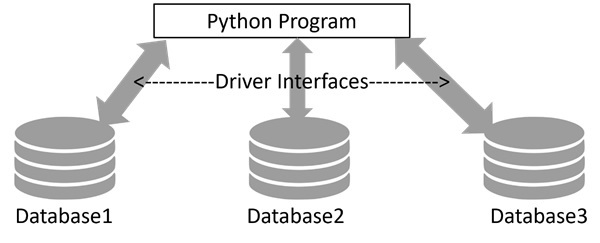
    To address this issue of compatibility, Python Enhancement Proposal (PEP) 249 introduced a standardized interface known as DB-API. This interface provides a consistent framework for database drivers, ensuring uniform behavior across different database systems. It simplifies the process of transitioning between various databases by establishing a common set of rules and methods.
    driver_interfaces

    Using SQLite with Python

    Python’s standard library includes sqlite3 module, a DB_API compatible driver for SQLite3 database. It serves as a reference implementation for DB-API. For other types of databases, you will have to install the relevant Python package −

    DatabasePython Package
    Oraclecx_oracle, pyodbc
    SQL Serverpymssql, pyodbc
    PostgreSQLpsycopg2
    MySQLMySQL Connector/Python, pymysql

    Working with SQLite

    Using SQLite with Python is very easy due to the built-in sqlite3 module. The process involves −

    • Connection Establishment − Create a connection object using sqlite3.connect(), providing necessary connection credentials such as server name, port, username, and password.
    • Transaction Management − The connection object manages database operations, including opening, closing, and transaction control (committing or rolling back transactions).
    • Cursor Object − Obtain a cursor object from the connection to execute SQL queries. The cursor serves as the gateway for CRUD (Create, Read, Update, Delete) operations on the database.

    In this tutorial, we shall learn how to access database using Python, how to store data of Python objects in a SQLite database, and how to retrieve data from SQLite database and process it using Python program.

    The sqlite3 Module

    SQLite is a server-less, file-based lightweight transactional relational database. It doesn’t require any installation and no credentials such as username and password are needed to access the database.

    Python’s sqlite3 module contains DB-API implementation for SQLite database. It is written by Gerhard Hring. Let us learn how to use sqlite3 module for database access with Python.

    Let us start by importing sqlite3 and check its version.

    >>>import sqlite3
    >>> sqlite3.sqlite_version
    '3.39.4'

    The Connection Object

    A connection object is set up by connect() function in sqlite3 module. First positional argument to this function is a string representing path (relative or absolute) to a SQLite database file. The function returns a connection object referring to the database.

    >>> conn=sqlite3.connect('testdb.sqlite3')>>>type(conn)<class'sqlite3.Connection'>

    Various methods are defined in connection class. One of them is cursor() method that returns a cursor object, about which we shall know in next section. Transaction control is achieved by commit() and rollback() methods of connection object. Connection class has important methods to define custom functions and aggregates to be used in SQL queries.

    The Cursor Object

    Next, we need to get the cursor object from the connection object. It is your handle to the database when performing any CRUD operation on the database. The cursor() method on connection object returns the cursor object.

    >>> cur=conn.cursor()>>>type(cur)<class'sqlite3.Cursor'>

    We can now perform all SQL query operations, with the help of its execute() method available to cursor object. This method needs a string argument which must be a valid SQL statement.

    Creating a Database Table

    We shall now add Employee table in our newly created ‘testdb.sqlite3’ database. In following script, we call execute() method of cursor object, giving it a string with CREATE TABLE statement inside.

    import sqlite3
    conn=sqlite3.connect('testdb.sqlite3')
    cur=conn.cursor()
    qry='''
    CREATE TABLE Employee (
    EmpID INTEGER PRIMARY KEY AUTOINCREMENT,
    FIRST_NAME TEXT (20),
    LAST_NAME TEXT(20),
    AGE INTEGER,
    SEX TEXT(1),
    INCOME FLOAT
    );
    '''try:
       cur.execute(qry)print('Table created successfully')except:print('error in creating table')
    conn.close()

    When the above program is run, the database with Employee table is created in the current working directory.

    We can verify by listing out tables in this database in SQLite console.

    sqlite>.open mydb.sqlite
    sqlite>.tables
    Employee
    

    INSERT Operation

    The INSERT Operation is required when you want to create your records into a database table.

    Example

    The following example, executes SQL INSERT statement to create a record in the EMPLOYEE table −

    import sqlite3
    conn=sqlite3.connect('testdb.sqlite3')
    cur=conn.cursor()
    qry="""INSERT INTO EMPLOYEE(FIRST_NAME,
       LAST_NAME, AGE, SEX, INCOME)
       VALUES ('Mac', 'Mohan', 20, 'M', 2000)"""try:
       cur.execute(qry)
       conn.commit()print('Record inserted successfully')except:
       conn.rollback()print('error in INSERT operation')
    conn.close()

    You can also use the parameter substitution technique to execute the INSERT query as follows −

    import sqlite3
    conn=sqlite3.connect('testdb.sqlite3')
    cur=conn.cursor()
    qry="""INSERT INTO EMPLOYEE(FIRST_NAME,
       LAST_NAME, AGE, SEX, INCOME)
       VALUES (?, ?, ?, ?, ?)"""try:
       cur.execute(qry,('Makrand','Mohan',21,'M',5000))
       conn.commit()print('Record inserted successfully')except Exception as e:
       conn.rollback()print('error in INSERT operation')
    conn.close()

    READ Operation

    READ Operation on any database means to fetch some useful information from the database.

    Once the database connection is established, you are ready to make a query into this database. You can use either fetchone() method to fetch a single record or fetchall() method to fetch multiple values from a database table.

    • fetchone() − It fetches the next row of a query result set. A result set is an object that is returned when a cursor object is used to query a table.
    • fetchall() − It fetches all the rows in a result set. If some rows have already been extracted from the result set, then it retrieves the remaining rows from the result set.
    • rowcount − This is a read-only attribute and returns the number of rows that were affected by an execute() method.

    Example

    In the following code, the cursor object executes SELECT * FROM EMPLOYEE query. The resultset is obtained with fetchall() method. We print all the records in the resultset with a for loop.

    import sqlite3
    conn=sqlite3.connect('testdb.sqlite3')
    cur=conn.cursor()
    qry="SELECT * FROM EMPLOYEE"try:# Execute the SQL command
       cur.execute(qry)# Fetch all the rows in a list of lists.
       results = cur.fetchall()for row in results:
          fname = row[1]
          lname = row[2]
          age = row[3]
          sex = row[4]
          income = row[5]# Now print fetched resultprint("fname={},lname={},age={},sex={},income={}".format(fname, lname, age, sex, income ))except Exception as e:print(e)print("Error: unable to fecth data")
    
    conn.close()

    It will produce the following output −

    fname=Mac,lname=Mohan,age=20,sex=M,income=2000.0
    fname=Makrand,lname=Mohan,age=21,sex=M,income=5000.0
    

    Update Operation

    UPDATE Operation on any database means to update one or more records, which are already available in the database.

    The following procedure updates all the records having income=2000. Here, we increase the income by 1000.

    import sqlite3
    conn=sqlite3.connect('testdb.sqlite3')
    cur=conn.cursor()
    qry="UPDATE EMPLOYEE SET INCOME = INCOME+1000 WHERE INCOME=?"try:# Execute the SQL command
       cur.execute(qry,(1000,))# Fetch all the rows in a list of lists.
       conn.commit()print("Records updated")except Exception as e:print("Error: unable to update data")
    conn.close()

    DELETE Operation

    DELETE operation is required when you want to delete some records from your database. Following is the procedure to delete all the records from EMPLOYEE where INCOME is less than 2000.

    import sqlite3
    conn=sqlite3.connect('testdb.sqlite3')
    cur=conn.cursor()
    qry="DELETE FROM EMPLOYEE WHERE INCOME<?"try:# Execute the SQL command
       cur.execute(qry,(2000,))# Fetch all the rows in a list of lists.
       conn.commit()print("Records deleted")except Exception as e:print("Error: unable to delete data")
    
    conn.close()

    Performing Transactions

    Transactions are a mechanism that ensure data consistency. Transactions have the following four properties −

    • Atomicity − Either a transaction completes or nothing happens at all.
    • Consistency − A transaction must start in a consistent state and leave the system in a consistent state.
    • Isolation − Intermediate results of a transaction are not visible outside the current transaction.
    • Durability − Once a transaction was committed, the effects are persistent, even after a system failure.

    Performing Transactions

    The Python DB API 2.0 provides two methods to either commit or rollback a transaction.

    Example

    You already know how to implement transactions. Here is a similar example −

    # Prepare SQL query to DELETE required records
    sql ="DELETE FROM EMPLOYEE WHERE AGE > ?"try:# Execute the SQL command
       cursor.execute(sql,(20,))# Commit your changes in the database
       db.commit()except:# Rollback in case there is any error
       db.rollback()

    COMMIT Operation

    Commit is an operation, which gives a green signal to the database to finalize the changes, and after this operation, no change can be reverted back.

    Here is a simple example to call the commit method.

    db.commit()

    ROLLBACK Operation

    If you are not satisfied with one or more of the changes and you want to revert back those changes completely, then use the rollback() method.

    Here is a simple example to call the rollback() method.

    db.rollback()

    The PyMySQL Module

    PyMySQL is an interface for connecting to a MySQL database server from Python. It implements the Python Database API v2.0 and contains a pure-Python MySQL client library. The goal of PyMySQL is to be a drop-in replacement for MySQLdb.

    Installing PyMySQL

    Before proceeding further, you make sure you have PyMySQL installed on your machine. Just type the following in your Python script and execute it −

    import PyMySQL
    

    If it produces the following result, then it means MySQLdb module is not installed −

    Traceback (most recent call last):
       File "test.py", line 3, in <module>
          Import PyMySQL
    ImportError: No module named PyMySQL
    

    The last stable release is available on PyPI and can be installed with pip −

    pip install PyMySQL
    

    Note − Make sure you have root privilege to install the above module.

    MySQL Database Connection

    Before connecting to a MySQL database, make sure of the following points −

    • You have created a database TESTDB.
    • You have created a table EMPLOYEE in TESTDB.
    • This table has fields FIRST_NAME, LAST_NAME, AGE, SEX and INCOME.
    • User ID “testuser” and password “test123” are set to access TESTDB.
    • Python module PyMySQL is installed properly on your machine.
    • You have gone through MySQL tutorial to understand MySQL Basics.

    Example

    To use MySQL database instead of SQLite database in earlier examples, we need to change the connect() function as follows −

    import PyMySQL
    # Open database connection
    db = PyMySQL.connect("localhost","testuser","test123","TESTDB")

    Apart from this change, every database operation can be performed without difficulty.

    Handling Errors

    There are many sources of errors. A few examples are a syntax error in an executed SQL statement, a connection failure, or calling the fetch method for an already cancelled or finished statement handle.

    The DB API defines a number of errors that must exist in each database module. The following table lists these exceptions.

    Sr.No.Exception & Description
    1WarningUsed for non-fatal issues. Must subclass StandardError.
    2ErrorBase class for errors. Must subclass StandardError.
    3InterfaceErrorUsed for errors in the database module, not the database itself. Must subclass Error.
    4DatabaseErrorUsed for errors in the database. Must subclass Error.
    5DataErrorSubclass of DatabaseError that refers to errors in the data.
    6OperationalErrorSubclass of DatabaseError that refers to errors such as the loss of a connection to the database. These errors are generally outside of the control of the Python scripter.
    7IntegrityErrorSubclass of DatabaseError for situations that would damage the relational integrity, such as uniqueness constraints or foreign keys.
    8InternalErrorSubclass of DatabaseError that refers to errors internal to the database module, such as a cursor no longer being active.
    9ProgrammingErrorSubclass of DatabaseError that refers to errors such as a bad table name and other things that can safely be blamed on you.
    10NotSupportedErrorSubclass of DatabaseError that refers to trying to call unsupported functionality.
  • Python – PIP

    Pip in Python

    In Python, pip is the standard package management system used to install and manage software packages written in Python. It allows you to easily install libraries and frameworks to extend the functionality of Python applications. pip comes bundled with Python, starting from Python version 3.4 and above.

    Installing pip

    If you are using Python 3.4 or above, pip is already included. However, if you don’t have pip installed, you can install it using the following steps −

    • Download get-pip.py script −
    curl https://bootstrap.pypa.io/get-pip.py -o get-pip.py
    

    Run the Script

    python get-pip.py
    

    Installing Packages with pip

    You can use pip to install any package from the Python Package Index (PyPI), which is the official third-party software repository for Python.

    PyPI hosts thousands of packages that you can easily integrate into your projects. These packages range from essential libraries for scientific computing, such as numpy and pandas, to web development frameworks like Django and Flask, and many more.

    Syntax

    Following is the basic syntax to install packages with pip in Python −

    pip install package_name
    

    Example

    To install the requests library, you can use the following command −

    pip install requests
    

    Example: Specifying Versions

    Sometimes, you may need a specific version of a package to ensure compatibility with your project. You can specify the version by using the == operator −

    pip install requests==2.25.1

    Example: Installing Multiple Packages

    You can also install multiple packages at once by listing their names separated by spaces −

    pip install numpy pandas matplotlib
    

    Upgrading Packages

    To upgrade a package to the latest version, you can use the –upgrade option with the pip install command.

    Syntax

    Following is the basic syntax to upgrade a package in Python −

    pip install --upgrade package_name
    

    Example

    To upgrade the requests library, you can use the following command −

    pip install --upgrade requests
    

    Listing Installed Packages

    You can list all the installed packages in your Python environment using the pip list command.

    When working on Python projects, it is often necessary to know which packages and versions are installed in your environment. pip provides several commands to list and manage installed packages.

    Basic Listing

    To list all installed packages in your current environment, use the following command −

    pip list

    This command outputs a list of all installed packages along with their respective versions. This is useful for quickly checking the state of your environment.

    Detailed Information

    For more detailed information about each installed package, you can use the pip show command followed by the package name −

    pip show requests
    

    This command displays detailed information about the specified package, including −

    • Name
    • Version
    • Summary
    • Home-page
    • Author
    • Author-email
    • License
    • Location
    • Requires
    • Required-by

    Outdated Packages

    To check for outdated packages in your environment, you can use the following command −

    pip list--outdated
    

    This command lists all installed packages that have newer versions available. The output includes the current version and the latest version available.

    Uninstalling Packages

    To uninstall a package, you can use the pip uninstall command.

    When you no longer need a Python package in your environment, you can uninstall it using pip. Here is how you can uninstall packages −

    Uninstalling a Single Package

    To uninstall a single package, use the pip uninstall command followed by the package name. For example, to uninstall the requests package −

    pip uninstall requests
    

    You will be prompted to confirm the uninstallation. Type y and press “Enter” to proceed.

    Uninstalling Multiple Packages

    You can also uninstall multiple packages in a single command by listing them all after pip uninstall −

    pip uninstall numpy pandas
    

    This command will uninstall both numpy and pandas packages.

    Freezing Installed Packages

    Freezing installed packages in Python refers to generating a list of all packages installed in your environment along with their versions. This list is saved to a “requirements.txt” file and can be used to recreate the exact environment elsewhere.

    Using “pip freeze”

    The pip freeze command lists all installed packages and their versions. You can direct its output to a “requirements.txt” file using the shell redirection > operator −

    pip freeze > requirements.txt
    

    This command creates or overwrites “requirements.txt” with a list of packages and versions in the format “package==version”.

    Using a requirements.txt File

    A requirements.txt file is a way to specify a list of packages to be installed using pip. This is useful for ensuring that all dependencies are installed for a project.

    Creating requirements.txt

    To create a “requirements.txt” file with the current environment’s packages, you can use the following command −

    pip freeze > requirements.txt
    

    Installing from requirements.txt

    To install all packages listed in a requirements.txt file, you can use the following command −

    pip install -r requirements.txt
    

    Using Virtual Environments

    Virtual environments allow you to create isolated Python environments for different projects. This ensures that dependencies for different projects do not interfere with each other.

    Creating a Virtual Environment

    You can create a virtual environment using the following command −

    python -m venv myenv
    

    Replace myenv with your preferred name for the virtual environment. This command creates a directory named myenv (or your specified name) containing a self-contained Python environment.

    Activating the Virtual Environment

    Depending on your operating system, activate the virtual environment −

    • On Windows −
    myenv\Scripts\activate
    

    On macOS and Linux −

    source myenv/bin/activate
    

    Once activated, your command prompt will change to show the name of the virtual environment (myenv in this case), indicating that you are now working within it.

    Deactivating the Virtual Environment

    To deactivate the virtual environment and return to the global Python environment, you can use the following command −

    deactivate
    

    Deleting the Virtual Environment

    If you no longer need the virtual environment, simply delete its directory (myenv or your chosen name) using the following command −

    rm -rf myenv   # On macOS and Linux
    rmdir /s myenv # On Windows
  • Python – Regular Expressions

    A regular expression is a special sequence of characters that helps you match or find other strings or sets of strings, using a specialized syntax held in a pattern. Regular expression are popularly known as regex or regexp.

    Usually, such patterns are used by string-searching algorithms for “find” or “find and replace” operations on strings, or for input validation.

    Large scale text processing in data science projects requires manipulation of textual data. The regular expressions processing is supported by many programming languages including Python. Python’s standard library has re module for this purpose.

    Since most of the functions defined in re module work with raw strings, let us first understand what the raw strings are.

    Raw Strings

    Regular expressions use the backslash character (‘\’) to indicate special forms or to allow special characters to be used without invoking their special meaning. Python on the other hand uses the same character as escape character. Hence Python uses the raw string notation.

    A string become a raw string if it is prefixed with r or R before the quotation symbols. Hence ‘Hello’ is a normal string were are r’Hello’ is a raw string.

    >>> normal="Hello">>>print(normal)
    Hello
    >>> raw=r"Hello">>>print(raw)
    Hello
    

    In normal circumstances, there is no difference between the two. However, when the escape character is embedded in the string, the normal string actually interprets the escape sequence, where as the raw string doesn’t process the escape character.

    >>> normal="Hello\nWorld">>>print(normal)
    Hello
    World
    >>> raw=r"Hello\nWorld">>>print(raw)
    Hello\nWorld
    

    In the above example, when a normal string is printed the escape character ‘\n’ is processed to introduce a newline. However because of the raw string operator ‘r’ the effect of escape character is not translated as per its meaning.

    Metacharacters

    Most letters and characters will simply match themselves. However, some characters are special metacharacters, and don’t match themselves. Meta characters are characters having a special meaning, similar to * in wild card.

    Here’s a complete list of the metacharacters −

    .^ $ *+ ? {}[] \ |()

    The square bracket symbols[ and ] indicate a set of characters that you wish to match. Characters can be listed individually, or as a range of characters separating them by a ‘-‘.

    Sr.No.Metacharacters & Description
    1[abc]match any of the characters a, b, or c
    2[a-c]which uses a range to express the same set of characters.
    3[a-z]match only lowercase letters.
    4[0-9]match only digits.
    5‘^’complements the character set in [].[^5] will match any character except’5’.

    ‘\’is an escaping metacharacter. When followed by various characters it forms various special sequences. If you need to match a [ or \, you can precede them with a backslash to remove their special meaning: \[ or \\.

    Predefined sets of characters represented by such special sequences beginning with ‘\’ are listed below −

    Sr.No.Metacharacters & Description
    1\dMatches any decimal digit; this is equivalent to the class [0-9].
    2\DMatches any non-digit character; this is equivalent to the class [^0-9].
    3\sMatches any whitespace character; this is equivalent to the class [\t\n\r\f\v].
    4\SMatches any non-whitespace character; this is equivalent to the class [^\t\n\r\f\v].
    5\wMatches any alphanumeric character; this is equivalent to the class [a-zAZ0-9_].
    6\WMatches any non-alphanumeric character. equivalent to the class [^a-zAZ0-9_].
    7.Matches with any single character except newline ‘\n’.
    8?match 0 or 1 occurrence of the pattern to its left
    9+1 or more occurrences of the pattern to its left
    10*0 or more occurrences of the pattern to its left
    11\bboundary between word and non-word and /B is opposite of /b
    12[..]Matches any single character in a square bracket and [^..] matches any single character not in square bracket.
    13\It is used for special meaning characters like \. to match a period or \+ for plus sign.
    14{n,m}Matches at least n and at most m occurrences of preceding
    15a| bMatches either a or b

    Python’s re module provides useful functions for finding a match, searching for a pattern, and substitute a matched string with other string etc.

    The re.match() Function

    This function attempts to match RE pattern at the start of string with optional flags. Following is the syntax for this function −

    re.match(pattern, string, flags=0)

    Here is the description of the parameters −

    Sr.No.Parameter & Description
    1patternThis is the regular expression to be matched.
    2StringThis is the string, which would be searched to match the pattern at the beginning of string.
    3FlagsYou can specify different flags using bitwise OR (|). These are modifiers, which are listed in the table below.

    The re.match() function returns a match object on success, None on failure. A match object instance contains information about the match: where it starts and ends, the substring it matched, etc.

    The match object’s start() method returns the starting position of pattern in the string, and end() returns the endpoint.

    If the pattern is not found, the match object is None.

    We use group(num) or groups() function of match object to get matched expression.

    Sr.No.Match Object Methods & Description
    1group(num=0)This method returns entire match (or specific subgroup num)
    2groups()This method returns all matching subgroups in a tuple (empty if there weren’t any)

    Example

    import re
    line ="Cats are smarter than dogs"
    matchObj = re.match(r'Cats', line)print(matchObj.start(), matchObj.end())print("matchObj.group() : ", matchObj.group())

    It will produce the following output −

    0 4
    matchObj.group() : Cats
    

    The re.search() Function

    This function searches for first occurrence of RE pattern within the string, with optional flags. Following is the syntax for this function −

    re.search(pattern, string, flags=0)

    Here is the description of the parameters −

    Sr.No.Parameter & Description
    1PatternThis is the regular expression to be matched.
    2StringThis is the string, which would be searched to match the pattern anywhere in the string.
    3FlagsYou can specify different flags using bitwise OR (|). These are modifiers, which are listed in the table below.

    The re.search function returns a match object on success, none on failure. We use group(num) or groups() function of match object to get the matched expression.

    Sr.No.Match Object Methods & Description
    1group(num=0)This method returns entire match (or specific subgroup num)
    2groups()This method returns all matching subgroups in a tuple (empty if there weren’t any)

    Example

    import re
    line ="Cats are smarter than dogs"
    matchObj = re.search(r'than', line)print(matchObj.start(), matchObj.end())print("matchObj.group() : ", matchObj.group())

    It will produce the following output −

    17 21
    matchObj.group() : than
    

    Matching Vs Searching

    Python offers two different primitive operations based on regular expressions, match checks for a match only at the beginning of the string, while search checks for a match anywhere in the string (this is what Perl does by default).

    Example

    import re
    line ="Cats are smarter than dogs";
    matchObj = re.match(r'dogs', line, re.M|re.I)if matchObj:print("match --> matchObj.group() : ", matchObj.group())else:print("No match!!")
    searchObj = re.search(r'dogs', line, re.M|re.I)if searchObj:print("search --> searchObj.group() : ", searchObj.group())else:print("Nothing found!!")

    When the above code is executed, it produces the following output −

    No match!!
    search --> matchObj.group() : dogs
    

    The re.findall() Function

    The findall() function returns all non-overlapping matches of pattern in string, as a list of strings or tuples. The string is scanned left-to-right, and matches are returned in the order found. Empty matches are included in the result.

    Syntax

    re.findall(pattern, string, flags=0)

    Parameters

    Sr.No.Parameter & Description
    1PatternThis is the regular expression to be matched.
    2StringThis is the string, which would be searched to match the pattern anywhere in the string.
    3FlagsYou can specify different flags using bitwise OR (|). These are modifiers, which are listed in the table below.

    Example

    import re
    string="Simple is better than complex."
    obj=re.findall(r"ple", string)print(obj)

    It will produce the following output −

    ['ple', 'ple']
    

    Following code obtains the list of words in a sentence with the help of findall() function.

    import re
    string="Simple is better than complex."
    obj=re.findall(r"\w*", string)print(obj)

    It will produce the following output −

    ['Simple', '', 'is', '', 'better', '', 'than', '', 'complex', '', '']
    

    The re.sub() Function

    One of the most important re methods that use regular expressions is sub.

    Syntax

    re.sub(pattern, repl, string,max=0)

    This method replaces all occurrences of the RE pattern in string with repl, substituting all occurrences unless max is provided. This method returns modified string.

    Example

    import re
    phone ="2004-959-559 # This is Phone Number"# Delete Python-style comments
    num = re.sub(r'#.*$',"", phone)print("Phone Num : ", num)# Remove anything other than digits
    num = re.sub(r'\D',"", phone)print("Phone Num : ", num)

    It will produce the following output −

    Phone Num : 2004-959-559
    Phone Num : 2004959559
    

    Example

    The following example uses sub() function to substitute all occurrences of is with was word −

    import re
    string="Simple is better than complex. Complex is better than complicated."
    obj=re.sub(r'is',r'was',string)print(obj)

    It will produce the following output −

    Simple was better than complex. Complex was better than complicated.
    

    The re.compile() Function

    The compile() function compiles a regular expression pattern into a regular expression object, which can be used for matching using its match(), search() and other methods.

    Syntax

    re.compile(pattern, flags=0)

    Flags

    Sr.No.Modifier & Description
    1re.IPerforms case-insensitive matching.
    2re.LInterprets words according to the current locale. This interpretation affects the alphabetic group (\w and \W), as well as word boundary behavior (\b and \B).
    3re.M Makes $ match the end of a line (not just the end of the string) and makes ^ match the start of any line (not just the start of the string).
    4re.SMakes a period (dot) match any character, including a newline.
    5re.UInterprets letters according to the Unicode character set. This flag affects the behavior of \w, \W, \b, \B.
    6re.XPermits “cuter” regular expression syntax. It ignores whitespace (except inside a set [] or when escaped by a backslash) and treats unescaped # as a comment marker.

    The sequence −

    prog = re.compile(pattern)
    result = prog.match(string)

    is equivalent to −

    result = re.match(pattern, string)

    But using re.compile() and saving the resulting regular expression object for reuse is more efficient when the expression will be used several times in a single program.

    Example

    import re
    string="Simple is better than complex. Complex is better than complicated."
    pattern=re.compile(r'is')
    obj=pattern.match(string)
    obj=pattern.search(string)print(obj.start(), obj.end())
    
    obj=pattern.findall(string)print(obj)
    
    obj=pattern.sub(r'was', string)print(obj)

    It will produce the following output −

    7 9
    ['is', 'is']
    Simple was better than complex. Complex was better than complicated.
    

    The re.finditer() Function

    This function returns an iterator yielding match objects over all non-overlapping matches for the RE pattern in string.

    Syntax

    re.finditer(pattern, string, flags=0)

    Example

    import re
    string="Simple is better than complex. Complex is better than complicated."
    pattern=re.compile(r'is')
    iterator = pattern.finditer(string)print(iterator )for match in iterator:print(match.span())

    It will produce the following output −

    (7, 9)
    (39, 41)
    

    Use Cases of Python Regex

    Finding all Adverbs

    findall() matches all occurrences of a pattern, not just the first one as search() does. For example, if a writer wanted to find all of the adverbs in some text, they might use findall() in the following manner −

    import re
    text ="He was carefully disguised but captured quickly by police."
    obj = re.findall(r"\w+ly\b", text)print(obj)

    It will produce the following output −

    ['carefully', 'quickly']
    

    Finding words starting with vowels

    import re
    text ='Errors should never pass silently. Unless explicitly silenced.'
    obj=re.findall(r'\b[aeiouAEIOU]\w+', text)print(obj)

    It will produce the following output −

    ['Errors', 'Unless', 'explicitly']
    

    Regular Expression Modifiers: Option Flags

    Regular expression literals may include an optional modifier to control various aspects of matching. The modifiers are specified as an optional flag. You can provide multiple modifiers using exclusive OR (|), as shown previously and may be represented by one of these −

    Sr.No.Modifier & Description
    1re.IPerforms case-insensitive matching.
    2re.LInterprets words according to the current locale. This interpretation affects the alphabetic group (\w and \W), as well as word boundary behavior(\b and \B).
    3re.MMakes $ match the end of a line (not just the end of the string) and makes ^ match the start of any line (not just the start of the string).
    4re.SMakes a period (dot) match any character, including a newline.
    5re.UInterprets letters according to the Unicode character set. This flag affects the behavior of \w, \W, \b, \B.
    6re.XPermits “cuter” regular expression syntax. It ignores whitespace (except inside a set [] or when escaped by a backslash) and treats unescaped # as a comment marker.

    Regular Expression Patterns

    Except for control characters, (+ ? . * ^ $ ( ) [ ] { } | \), all characters match themselves. You can escape a control character by preceding it with a backslash.

    Following table lists the regular expression syntax that is available in Python −

    Sr.No.Pattern & Description
    1^Matches beginning of line.
    2$Matches end of line.
    3.Matches any single character except newline. Using m option allows it to match newline as well.
    4[…]Matches any single character in brackets.
    5[^…]Matches any single character not in brackets
    6re*Matches 0 or more occurrences of preceding expression.
    7re+Matches 1 or more occurrence of preceding expression.
    8re?Matches 0 or 1 occurrence of preceding expression.
    9re{ n}Matches exactly n number of occurrences of preceding expression.
    10re{ n,}Matches n or more occurrences of preceding expression.
    11re{ n, m}Matches at least n and at most m occurrences of preceding expression.
    12a| bMatches either a or b.
    13(re)Groups regular expressions and remembers matched text.
    14(?imx)Temporarily toggles on i, m, or x options within a regular expression. If in parentheses, only that area is affected.
    15(?-imx)Temporarily toggles off i, m, or x options within a regular expression. If in parentheses, only that area is affected.
    16(?: re)Groups regular expressions without remembering matched text.
    17(?imx: re)Temporarily toggles on i, m, or x options within parentheses.
    18(?-imx: re)Temporarily toggles off i, m, or x options within parentheses.
    19(?#…)Comment.
    20(?= re)Specifies position using a pattern. Doesn’t have a range.
    21(?! re)Specifies position using pattern negation. Doesn’t have a range.
    22(?> re)Matches independent pattern without backtracking.
    23\wMatches word characters.
    24\WMatches nonword characters.
    25\sMatches whitespace. Equivalent to [\t\n\r\f].
    26\SMatches nonwhitespace.
    27\dMatches digits. Equivalent to [0-9].
    28\DMatches nondigits.
    29\AMatches beginning of string.
    30\ZMatches end of string. If a newline exists, it matches just before newline.
    31\zMatches end of string.
    32\GMatches point where last match finished.
    33\bMatches word boundaries when outside brackets. Matches backspace (0x08) when inside brackets.
    34\BMatches nonword boundaries.
    35\n, \t, etc.Matches newlines, carriage returns, tabs, etc.
    36\1…\9Matches nth grouped subexpression.
    37\10Matches nth grouped subexpression if it matched already. Otherwise refers to the octal representation of a character code.

    Regular Expression Examples

    Literal characters

    Sr.No.Example & Description
    1pythonMatch “python”.

    Character classes

    Sr.No.Example & Description
    1[Pp]ythonMatch “Python” or “python”
    2rub[ye]Match “ruby” or “rube”
    3[aeiou]Match any one lowercase vowel
    4[0-9]Match any digit; same as [0123456789]
    5[a-z]Match any lowercase ASCII letter
    6[A-Z]Match any uppercase ASCII letter
    7[a-zA-Z0-9]Match any of the above
    8[^aeiou]Match anything other than a lowercase vowel
    9[^0-9]Match anything other than a digit

    Special Character Classes

    Sr.No.Example & Description
    1.Match any character except newline
    2\dMatch a digit: [0-9]
    3\DMatch a nondigit: [^0-9]
    4\sMatch a whitespace character: [ \t\r\n\f]
    5\SMatch nonwhitespace: [^ \t\r\n\f]
    6\wMatch a single word character: [A-Za-z0-9_]
    7\WMatch a nonword character: [^A-Za-z0-9_]

    Repetition Cases

    Sr.No.Example & Description
    1ruby?Match “rub” or “ruby”: the y is optional
    2ruby*Match “rub” plus 0 or more ys
    3ruby+Match “rub” plus 1 or more ys
    4\d{3}Match exactly 3 digits
    5\d{3,}Match 3 or more digits
    6\d{3,5}Match 3, 4, or 5 digits

    Nongreedy repetition

    This matches the smallest number of repetitions −

    Sr.No.Example & Description
    1<.*>Greedy repetition: matches “<python>perl>”
    2<.*?>Nongreedy: matches “<python>” in “<python>perl>”

    Grouping with Parentheses

    Sr.No.Example & Description
    1\D\d+No group: + repeats \d
    2(\D\d)+Grouped: + repeats \D\d pair
    3([Pp]ython(, )?)+Match “Python”, “Python, python, python”, etc.

    Backreferences

    This matches a previously matched group again −

    Sr.No.Example & Description
    1([Pp])ython&\1ailsMatch python&pails or Python&Pails
    2([‘”])[^\1]*\1Single or double-quoted string. \1 matches whatever the 1st group matched. \2 matches whatever the 2nd group matched, etc.

    Alternatives

    Sr.No.Example & Description
    1python|perlMatch “python” or “perl”
    2rub(y|le))Match “ruby” or “ruble”
    3Python(!+|\?)“Python” followed by one or more ! or one ?

    Anchors

    This needs to specify match position.

    Sr.No.Example & Description
    1^PythonMatch “Python” at the start of a string or internal line
    2Python$Match “Python” at the end of a string or line
    3\APythonMatch “Python” at the start of a string
    4Python\ZMatch “Python” at the end of a string
    5\bPython\bMatch “Python” at a word boundary
    6\brub\B\B is nonword boundary: match “rub” in “rube” and “ruby” but not alone
    7Python(?=!)Match “Python”, if followed by an exclamation point.
    8Python(?!!)Match “Python”, if not followed by an exclamation point.

    Special Syntax with Parentheses

    Sr.No.Example & Description
    1R(?#comment)Matches “R”. All the rest is a comment
    2R(?i)ubyCase-insensitive while matching “uby”
    3R(?i:uby)Same as above
    4rub(?:y|le))Group only without creating \1 backreference
  • Python – Recursion

    Recursion is a fundamental programming concept where a function calls itself in order to solve a problem. This technique breaks down a complex problem into smaller and more manageable sub-problems of the same type. In Python, recursion is implemented by defining a function that makes one or more calls to itself within its own body.

    Components of Recursion

    As we discussed before Recursion is a technique where a function calls itself. Here for understanding recursion, it’s required to know its key components. Following are the primary components of the recursion −

    • Base Case
    • Recursive Case

    Base Case

    The Base case is a fundamental concept in recursion, if serving as the condition under which a recursive function stops calling itself. It is essential for preventing infinite recursion and subsequent stack overflow errors.

    The base case provides a direct solution to the simplest instance of the problem ensuring that each recursive call gets closer to this terminating condition.

    The most popular example of recursion is calculation of factorial. Mathematically factorial is defined as −

    n! = n × (n-1)!
    

    It can be seen that we use factorial itself to define factorial. Hence this is a fit case to write a recursive function. Let us expand above definition for calculation of factorial value of 5.

    5! =5 × 4!
       5 × 4 × 3!
       5 × 4 × 3 × 2!
       5 × 4 × 3 × 2 × 1!
       5 × 4 × 3 × 2 × 1=120

    While we can perform this calculation using a loop, its recursive function involves successively calling it by decrementing the number till it reaches 1.

    Example

    The following example shows hows you can use a recursive function to calculate factorial −

    deffactorial(n):if n ==1:print(n)return1#base caseelse:print(n,'*', end=' ')return n * factorial(n-1)#Recursive caseprint('factorial of 5=', factorial(5))

    The above programs generates the following output −

    5 * 4 * 3 * 2 * 1
    factorial of 5= 120
    

    Recursive Case

    The recursive case is the part of a recursive function where the function calls itself to solve a smaller or simpler instance of the same problem. This mechanism allows a complex problem to be broken down into more manageable sub-problems where each them is a smaller version of the original problem.

    The recursive case is essential for progressing towards the base case, ensuring that the recursion will eventually terminate.

    Example

    Following is the example of the Recursive case. In this example we are generating the Fibonacci sequence in which the recursive case sums the results of the two preceding Fibonacci numbers −

    deffibonacci(n):if n <=0:return0# Base case for n = 0elif n ==1:return1# Base case for n = 1else:return fibonacci(n -1)+ fibonacci(n -2)# Recursive case
            
    fib_series =[fibonacci(i)for i inrange(6)]print(fib_series)

    The above programs generates the following output −

    [0, 1, 1, 2, 3, 5]
    

    Binary Search using Recursion

    Binary search is a powerful algorithm for quickly finding elements in sorted lists, with logarithmic time complexity making it highly efficient.

    Let us have a look at another example to understand how recursion works. The problem at hand is to check whether a given number is present in a list.

    While we can perform a sequential search for a certain number in the list using a for loop and comparing each number, the sequential search is not efficient especially if the list is too large. The binary search algorithm that checks if the index ‘high’ is greater than index ‘low. Based on value present at ‘mid’ variable, the function is called again to search for the element.

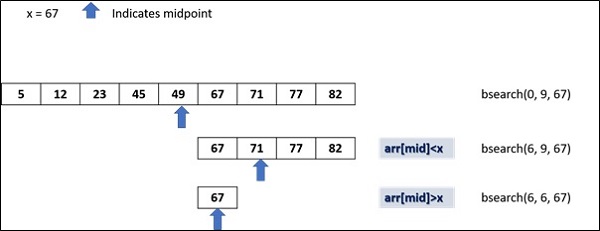
    We have a list of numbers, arranged in ascending order. The we find the midpoint of the list and restrict the checking to either left or right of midpoint depending on whether the desired number is less than or greater than the number at midpoint.

    The following diagram shows how binary search works −

    Python Recursion

    Example

    The following code implements the recursive binary searching technique −

    defbsearch(my_list, low, high, elem):if high >= low:
          mid =(high + low)//2if my_list[mid]== elem:return mid
          elif my_list[mid]> elem:return bsearch(my_list, low, mid -1, elem)else:return bsearch(my_list, mid +1, high, elem)else:return-1
    
    my_list =[5,12,23,45,49,67,71,77,82]
    num =67print("The list is")print(my_list)print("Check for number:", num)
    my_result = bsearch(my_list,0,len(my_list)-1,num)if my_result !=-1:print("Element found at index ",str(my_result))else:print("Element not found!")

    Output

    The list is
    [5, 12, 23, 45, 49, 67, 71, 77, 82]
    Check for number: 67
    Element found at index 5
  • Python – Decorators

    A Decorator in Python is a function that receives another function as argument. The argument function is the one to be decorated by decorator. The behaviour of argument function is extended by the decorator without actually modifying it.

    In this chapter, we whall learn how to use Python decorator.

    Defining Function Decorator

    Function in Python is a first order object. It means that it can be passed as argument to another function just as other data types such as number, string or list etc. It is also possible to define a function inside another function. Such a function is called nested function. Moreover, a function can return other function as well.

    The typical definition of a decorator function is as under −

    defdecorator(arg_function):#arg_function to be decorateddefnested_function():#this wraps the arg_function and extends its behaviour#call arg_function
          arg_function()return nested_function
    

    Here a normal Python function −

    deffunction():print("hello")

    You can now decorate this function to extend its behaviour by passing it to decorator −

    function=decorator(function)

    If this function is now executed, it will show output extended by decorator.

    Examples of Python Decorators

    Practice the following examples to understand the concept of Python decorators −

    Example 1

    Following code is a simple example of decorator −

    defmy_function(x):print("The number is=",x)defmy_decorator(some_function,num):defwrapper(num):print("Inside wrapper to check odd/even")if num%2==0:
             ret="Even"else:
             ret="Odd!"
          some_function(num)return ret
       print("wrapper function is called")return wrapper
    
    no=10
    my_function = my_decorator(my_function, no)print("It is ",my_function(no))

    The my_function() just prints out the received number. However, its behaviour is modified by passing it to a my_decorator. The inner function receives the number and returns whether it is odd/even. Output of above code is −

    wrapper function is called
    Inside wrapper to check odd/even
    The number is= 10
    It is Even
    

    Example 2

    An elegant way to decorate a function is to mention just before its definition, the name of decorator prepended by @ symbol. The above example is re-written using this notation −

    defmy_decorator(some_function):defwrapper(num):print("Inside wrapper to check odd/even")if num%2==0:
             ret="Even"else:
             ret="Odd!"
          some_function(num)return ret
       print("wrapper function is called")return wrapper
    
    @my_decoratordefmy_function(x):print("The number is=",x)
    no=10print("It is ",my_function(no))

    Python’s standard library defines following built-in decorators −

    @classmethod Decorator

    The classmethod is a built-in function. It transforms a method into a class method. A class method is different from an instance method. Instance method defined in a class is called by its object. The method received an implicit object referred to by self. A class method on the other hand implicitly receives the class itself as first argument.

    Syntax

    In order to declare a class method, the following notation of decorator is used −

    classMyclass:@classmethoddefmymethod(cls):#....

    The @classmethod form is that of function decorator as described earlier. The mymethod receives reference to the class. It can be called by the class as well as its object. That means Myclass.mymethod as well as Myclass().mymethod both are valid calls.

    Example of @classmethod Decorator

    Let us understand the behaviour of class method with the help of following example −

    classcounter:
       count=0def__init__(self):print("init called by ", self)
          counter.count=counter.count+1print("count=",counter.count)@classmethoddefshowcount(cls):print("called by ",cls)print("count=",cls.count)
    
    c1=counter()
    c2=counter()print("class method called by object")
    c1.showcount()print("class method called by class")
    counter.showcount()

    In the class definition count is a class attribute. The __init__() method is the constructor and is obviously an instance method as it received self as object reference. Every object declared calls this method and increments count by 1.

    The @classmethod decorator transforms showcount() method into a class method which receives reference to the class as argument even if it is called by its object. It can be seen even when c1 object calls showcount, it displays reference of counter class.

    It will display the following output −

    init called by <__main__.counter object at 0x000001D32DB4F0F0>
    count= 1
    init called by <__main__.counter object at 0x000001D32DAC8710>
    count= 2
    class method called by object
    called by <class '__main__.counter'>
    count= 2
    class method called by class
    called by <class '__main__.counter'>
    

    @staticmethod Decorator

    The staticmethod is also a built-in function in Python standard library. It transforms a method into a static method. Static method doesn’t receive any reference argument whether it is called by instance of class or class itself. Following notation used to declare a static method in a class −

    Syntax

    classMyclass:@staticmethoddefmymethod():#....

    Even though Myclass.mymethod as well as Myclass().mymethod both are valid calls, the static method receives reference of neither.

    Example of @staticmethod Decorator

    The counter class is modified as under −

    classcounter:
       count=0def__init__(self):print("init called by ", self)
          counter.count=counter.count+1print("count=",counter.count)@staticmethoddefshowcount():print("count=",counter.count)
    
    c1=counter()
    c2=counter()print("class method called by object")
    c1.showcount()print("class method called by class")
    counter.showcount()

    As before, the class attribute count is increment on declaration of each object inside the __init__() method. However, since mymethod(), being a static method doesn’t receive either self or cls parameter. Hence value of class attribute count is displayed with explicit reference to counter.

    The output of the above code is as below −

    init called by <__main__.counter object at 0x000002512EDCF0B8>
    count= 1
    init called by <__main__.counter object at 0x000002512ED48668>
    count= 2
    class method called by object
    count= 2
    class method called by class
    count= 2
    

    @property Decorator

    Python’s property() built-in function is an interface for accessing instance variables of a class. The @property decorator turns an instance method into a “getter” for a read-only attribute with the same name, and it sets the docstring for the property to “Get the current value of the instance variable.”

    You can use the following three decorators to define a property −

    • @property − Declares the method as a property.
    • @<property-name>.setter: − Specifies the setter method for a property that sets the value to a property.
    • @<property-name>.deleter − Specifies the delete method as a property that deletes a property.

    A property object returned by property() function has getter, setter, and delete methods.

    property(fget=None, fset=None, fdel=None, doc=None)

    The fget argument is the getter method, fset is setter method. It optionally can have fdel as method to delete the object and doc is the documentation string.

    Syntax

    The property() object’s setter and getter may also be assigned with the following syntax also.

    speed =property()
    speed=speed.getter(speed, get_speed)
    speed=speed.setter(speed, set_speed)

    Where get_speed() and set_speeds() are the instance methods that retrieve and set the value to an instance variable speed in Car class.

    The above statements can be implemented by @property decorator. Using the decorator car class is re-written as −

    Example of @property Decorator

    classcar:def__init__(self, speed=40):
          self._speed=speed
          return@propertydefspeed(self):return self._speed
       @speed.setterdefspeed(self, speed):if speed<0or speed>100:print("speed limit 0 to 100")return
          self._speed=speed
          return
    
    c1=car()print(c1.speed)#calls getter
    c1.speed=60#calls setter

    Property decorator is very convenient and recommended method of handling instance

  • Python – Closures

    What is a Closure?

    A Python closure is a nested function which has access to a variable from an enclosing function that has finished its execution. Such a variable is not bound in the local scope. To use immutable variables (number or string), we have to use the non-local keyword.

    The main advantage of Python closures is that we can help avoid the using global values and provide some form of data hiding. They are used in Python decorators.

    Closures are closely related to nested functions and allow inner functions to capture and retain the enclosing function’s local state, even after the outer function has finished execution. Understanding closures requires familiarity with nested functions, variable scope and how Python handles function objects.

    • Nested Functions: In Python functions can be defined inside other functions. These are called nested functions or inner functions.
    • Accessing Enclosing Scope: Inner functions can access variables from the enclosing i.e. outer scope. This is where closures come into play.
    • Retention of State: When an inner function i.e. closure captures and retains variables from its enclosing scope, even if the outer function has completed execution or the scope is no longer available.

    Nested Functions

    Nested functions in Python refer to the practice of defining one function inside another function. This concept allows us to organize code more effectively, encapsulate functionality and manage variable scope.

    Following is the example of nested functions where functionB is defined inside functionA. Inner function is then called from inside the outer function’s scope.

    Example

    deffunctionA():print("Outer function")deffunctionB():print("Inner function")
       functionB()
    
    functionA()

    Output

    Outer function
    Inner function
    

    If the outer function receives any argument, it can be passed to the inner function as in the below example.

    deffunctionA(name):print("Outer function")deffunctionB():print("Inner function")print("Hi {}".format(name))
       functionB()
       
    functionA("Python")

    Output

    Outer function
    Inner function
    Hi Python
    

    Variable Scope

    When a closure is created i.e. an inner function that captures variables from its enclosing scope, it retains access to those variables even after the outer function has finished executing. This behavior allows closures to “remember” and manipulate the values of variables from the enclosing scope.

    Example

    Following is the example of the closure with the variable scope −

    defouter_function(x):
        y =10definner_function(z):return x + y + z  # x and y are captured from the enclosing scopereturn inner_function
    
    closure = outer_function(5)
    result = closure(3)print(result)

    Output

    18
    

    Creating a closure

    Creating a closure in Python involves defining a nested function within an outer function and returning the inner function. Closures are useful for capturing and retaining the state of variables from the enclosing scope.

    Example

    In the below example, we have a functionA function which creates and returns another function functionB. The nested functionB function is the closure.

    The outer functionA function returns a functionB function and assigns it to the myfunction variable. Even if it has finished its execution. However, the printer closure still has access to the name variable.

    Following is the example of creating the closure in python −

    deffunctionA(name):
       name ="New name"deffunctionB():print(name)return functionB
       
    myfunction = functionA("My name")
    myfunction()

    Output

    New name
    

    nonlocal Keyword

    In Python, nonlocal keyword allows a variable outside the local scope to be accessed. This is used in a closure to modify an immutable variable present in the scope of outer variable. Here is the example of the closure with the nonlocal keyword.

    deffunctionA():
       counter =0deffunctionB():nonlocal counter
          counter+=1return counter
       return functionB
    
    myfunction = functionA()
    
    retval = myfunction()print("Counter:", retval)
    
    retval = myfunction()print("Counter:", retval)
    
    retval = myfunction()print("Counter:", retval)

    Output

    Counter: 1
    Counter: 2
    Counter: 3
  • Python – Lambda Expressions

    In Programming, functions are essential, they allows us to group the logic into the reusable blocks, making the code cleaner and easier to maintain. Generally, when we define a function we give it a name, parameters and a body.

    For instance, if we need a small function that will be used only once such as sorting a list, filtering data or performing a calculation. In this cases, writing the full function feels like unnecessary, this is where we use the Lambda Expressions. Let’s dive into the tutorial to understand more about the lambda expressions.

    Lambda Expressions

    Lambda Expressions is a used to define a small, nameless (anonymous) function in a single line. We use lambda to create a function instantly and pass it wherever a function is need, Instead of writing the complete function with the def keyword (Python) or similar keyword in other languages. For example, instead of writing:

    def add(a, b):
        return a + b
    

    We can use the lambda expression as:

    add = lambda a, b: a + b
    

    Both perform the same operation adding two numbers, but the lambda version is shorter and can be created at the point of use, without defining it separately.

    Syntax

    Following is the syntax for lambda expressions:

    lambda parameters: expression
    

    Following are the parameters –

    • lambda − It indicates the keyword.
    • parameters − They are the inputs, just like function arguments.
    • expression − It indicates the expression to gets evaluated and returned.

    Use of Lambda Expressions

    The lambda expressions are not meant to replace all the regular functions. They are useful in specific situations:

    • Inline Usage − They can be used directly where the function is needed, avoiding the need to create a separate function.
    • Conciseness − They allows us to define the simple function in one line without writing a full def block.
    • Functional Programming − They integrate smoothly with higher-order functions like map(), filter() and reduce().

    Examples of Using Lambda Expressions

    Let’s explore some of the practical examples to understand more about the Lambda expressions.

    Example 1

    Consider the following example, where we are going to use the lamba with the map() function.

    array =[1,2,3]
    result =list(map(lambda x: x **2, array))print(result)

    The output of the above program is –

    [1, 4, 9]
    

    Example 2

    In the following example, we are going to use the lambda with the filter() function.

    array =[5,10,15,20]
    result =list(filter(lambda x: x %2==0, array))print(result)

    Following is the output of the above program –

    [10, 20]
    

    Example 3

    Let’s look at the following example, where we are going to use the lambda with the sorted() function.

    array =['Ravi','Ram','Ravan','Richel']
    result =sorted(array, key=lambda x:len(x))print(result)

    The output of the above program is –

    ['Ram', 'Ravi', 'Ravan', 'Richel']
  • Python – Generator Expressions

    Python is the versatile language with many ways to handle the data efficiently. Among them one of the feature is the generator expressions, Which create the iterators easily in a memory-efficient way. In this tutorial we are going to explore about the generator expressions.

    Generator Expression

    The Generator Expression is a simple way to create a generator, an iterator that process items one by one instead of creating an entire collection in memory at once.

    Syntax

    Following is the syntax for generator expression:

    (expression for item in iterable if condition)

    Following are the parameters –

    • expression − It is the value to process for each item.
    • item − It indicates the loop variable.
    • iterable − It indicates the sequence or iterator we loop over.
    • if condition (optional) − It filters the items based on the condition.

    Generator expressions looks like a list comprehension, but it uses the parentheses () instead of the square brackets [] For example,

    A List Comprehension

    a =[x * x for x inrange(5)]print(a)

    The output of the above program is –

    [0, 1, 4, 9, 16]
    

    A Generator Expression

    a =(x * x for x inrange(5))print(a)

    Following is the output of the above program –

    <generator object <genexpr> at 0x7f007ac5d080>
    

    When we try to print the generator, we can’t see the data directly. Instead we can observe the generator object, because the values aren’t all produced at once. we need to iterate over it to retrieve them:

    a =(x * x for x inrange(5))for value in a:print(value)

    The output of the above program is –

    0
    1
    4
    9
    16
    

    Use of Generator Expressions

    The main reason of using the generator expressions is efficiency in terms of both memory and speed.

    • Memory Efficiency − It doesn’t build the whole result list in the memory. Instead, it produces values on demand. It is useful when working with the large datasets or infinite sequences.
    • Lazy Evaluation − The generator only produce the value when we ask for it. If we don’t use all the values, no extra computation is wasted.
    • Cleaner Code − It makes the code compact and readable, especially for simple data transformations.

    Examples of Using Generator Expressions

    Let’s explore some of the practical examples to understand more about the generator expressions.

    Example 1

    Consider the following example, where we are going to count the even number in a range based on the condition.

    a =sum(1for x inrange(100)if x %2==0)print(a)

    The output of the above program is –

    50
    

    Example 2

    In the following example, we are going to combine the data from two lists without storing all combinations.

    a =['Ravi','Ramu','Remo']
    b =['BMW','Cruze']
    c =(f"{name}-{color}"for name in a for color in b)for pair in c:print(pair)

    Following is the output of the above program –

    Ravi-BMW
    Ravi-Cruze
    Ramu-BMW
    Ramu-Cruze
    Remo-BMW
    Remo-Cruze
  • Python – Generators

    Python Generators

    Generators in Python are a convenient way to create iterators. They allow us to iterate through a sequence of values which means, values are generated on the fly and not stored in memory, which is especially useful for large datasets or infinite sequences.

    The generator in Python is a special type of function that returns an iterator object. It appears similar to a normal Python function in that its definition also starts with def keyword. However, instead of return statement at the end, generator uses the yield keyword.

    Syntax

    The following is the syntax of the generator() function −

    defgenerator():......yield obj
    it = generator()next(it)...

    Creating Generators

    There are two primary ways to create generators in python −

    • Using Generator Functions
    • Using Generator Expressions

    Using Generator Functions

    The generator function uses ‘yield’ statement for returning the values all at a time. Each time the generators __next__() method is called the generator resumes where it left off i.e. from right after the last yield statement. Here’s the example of creating the generator function.

    defcount_up_to(max_value):
        current =1while current <= max_value:yield current
            current +=1# Using the generator
    counter = count_up_to(5)for number in counter:print(number)

    Output

    1
    2
    3
    4
    5
    

    Using Generator Expressions

    Generator expressions provide a compact way to create generators. They use a syntax similar to list comprehensions but used parentheses i.e. “{}” instead of square brackets i.e. “[]”

    gen_expr =(x * x for x inrange(1,6))for value in gen_expr:print(value)

    Output

    1
    4
    9
    16
    25
    

    Exception Handling in Generators

    We can create a generator and iterate it using a ‘while’ loop with exception handling for ‘StopIteration’ exception. The function in the below code is a generator that successively yield integers from 1 to 5.

    When this function is called, it returns an iterator. Every call to next() method transfers the control back to the generator and fetches next integer.

    defgenerator(num):for x inrange(1, num+1):yield x
       return
       
    it = generator(5)whileTrue:try:print(next(it))except StopIteration:break

    Output

    1
    2
    3
    4
    5
    

    Normal function vs Generator function

    Normal functions and generator functions in Python serve different purposes and exhibit distinct behaviors. Understanding their differences is essential for leveraging them effectively in our code.

    A normal function computes and returns a single value or a set of values whether in a list or tuple, when called. Once it returns, the function’s execution is complete and all local variables are discarded where as a generator function yields values one at a time by suspending and resuming its state between each yield. It uses the yield statement instead of return.

    Example

    In this example we are creating a normal function and build a list of Fibonacci numbers and then iterate the list using a loop −

    deffibonacci(n):
       fibo =[]
       a, b =0,1whileTrue:
          c=a+b
          if c>=n:break
          fibo.append(c)
          a, b = b, c
       return fibo
    f = fibonacci(10)for i in f:print(i)

    Output

    1
    2
    3
    5
    8
    

    Example

    In the above example we created a fibonacci series using the normal function and When we want to collect all Fibonacci series numbers in a list and then the list is traversed using a loop. Imagine that we want Fibonacci series going upto a large number.

    In such cases, all the numbers must be collected in a list requiring huge memory. This is where generator is useful as it generates a single number in the list and gives it for consumption. Following code is the generator-based solution for list of Fibonacci numbers −

    deffibonacci(n):
       a, b =0,1whileTrue:
          c=a+b
          if c>=n:breakyield c
          a, b = b, c
       return
       
    f = fibonacci(10)whileTrue:try:print(next(f))except StopIteration:break

    Output

    1
    2
    3
    5
    8
    

    Asynchronous Generator

    An asynchronous generator is a co-routine that returns an asynchronous iterator. A co-routine is a Python function defined with async keyword, and it can schedule and await other co-routines and tasks.

    Just like a normal generator, the asynchronous generator yields incremental item in the iterator for every call to anext() function, instead of next() function.

    Syntax

    The following is the syntax of the Asynchronous Generator −

    asyncdefgenerator():......yield obj
    it = generator()
    anext(it)...

    Example

    Following code demonstrates a coroutine generator that yields incrementing integers on every iteration of an async for loop.

    import asyncio
    
    asyncdefasync_generator(x):for i inrange(1, x+1):await asyncio.sleep(1)yield i
          
    asyncdefmain():asyncfor item in async_generator(5):print(item)
          
    asyncio.run(main())

    Output

    1
    2
    3
    4
    5
    

    Example

    Let us now write an asynchronous generator for Fibonacci numbers. To simulate some asynchronous task inside the co-routine, the program calls sleep() method for a duration of 1 second before yielding the next number. As a result, we will get the numbers printed on the screen after a delay of one second.

    import asyncio
    
    asyncdeffibonacci(n):
       a, b =0,1whileTrue:
          c=a+b
          if c>=n:breakawait asyncio.sleep(1)yield c
          a, b = b, c
       returnasyncdefmain():
       f = fibonacci(10)asyncfor num in f:print(num)
          
    asyncio.run(main())

    Output

    1
    2
    3
    5
    8
  • Python – Iterators

    Python Iterators

    An iterator in Python is an object that enables traversal through a collection such as a list or a tuple, one element at a time. It follows the iterator protocol by using the implementation of two methods __iter__() and __next__().

    The __iter__() method returns the iterator object itself and the __next__() method returns the next element in the sequence by raising a StopIteration exception when no more elements are available.

    Iterators provide a memory-efficient way to iterate over data, especially useful for large datasets. They can be created from iterable objects using the iter() function or implemented using custom classes and generators.

    Iterables vs Iterators

    Before going deep into the iterator working, we should know the difference between the Iterables and Iterators.

    • Iterable: An object capable of returning its members one at a time (e.g., lists, tuples).
    • Iterator: An object representing a stream of data, returned one element at a time.

    We normally use for loop to iterate through an iterable as follows −

    for element in sequence:print(element)

    Python’s built-in method iter() implements __iter__() method. It receives an iterable and returns iterator object.

    Example of Python Iterator

    Following code obtains iterator object from sequence types such as list, string and tuple. The iter() function also returns keyiterator from dictionary.

    print(iter("aa"))print(iter([1,2,3]))print(iter((1,2,3)))print(iter({}))

    It will produce the following output −

    <str_iterator object at 0x7fd0416b42e0>
    <list_iterator object at 0x7fd0416b42e0>
    <tuple_iterator object at 0x7fd0416b42e0>
    <dict_keyiterator object at 0x7fd041707560>
    

    However, int id not iterable, hence it produces TypeError.

    iterator =iter(100)print(iterator)

    It will produce the following output −

    Traceback (most recent call last):
       File "C:\Users\user\example.py", line 5, in <module>
          print (iter(100))
                ^^^^^^^^^
    TypeError: 'int' object is not iterable
    

    Error Handling in Iterators

    Iterator object has a method named __next__(). Every time it is called, it returns next element in iterator stream. Call to next() function is equivalent to calling __next__() method of iterator object.

    This method which raises a StopIteration exception when there are no more items to return.

    Example

    In the following is an example the iterator object we have created have only 3 elements and we are iterating through it more than thrice −

    it =iter([1,2,3])print(next(it))print(it.__next__())print(it.__next__())print(next(it))

    It will produce the following output −

    1
    2
    3
    Traceback (most recent call last):
       File "C:\Users\user\example.py", line 5, in <module>
          print (next(it))
                ^^^^^^^^
    StopIteration
    

    This exception can be caught in the code that consumes the iterator using try and except blocks, though it’s more common to handle it implicitly by using constructs like for loops which manage the StopIteration exception internally.

    it =iter([1,2,3,4,5])print(next(it))whileTrue:try:
          no =next(it)print(no)except StopIteration:break

    It will produce the following output −

    1
    2
    3
    4
    5
    

    Custom Iterator

    A custom iterator in Python is a user-defined class that implements the iterator protocol which consists of two methods __iter__() and __next__(). This allows the class to behave like an iterator, enabling traversal through its elements one at a time.

    To define a custom iterator class in Python, the class must define these methods.

    Example

    In the following example, the Oddnumbers is a class implementing __iter__() and __next__() methods. On every call to __next__(), the number increments by 2 thereby streaming odd numbers in the range 1 to 10.

    classOddnumbers:def__init__(self, end_range):
          self.start =-1
          self.end = end_range
    
       def__iter__(self):return self
    
       def__next__(self):if self.start &lt self.end-1:
             self.start +=2return self.start
          else:raise StopIteration
    
    countiter = Oddnumbers(10)whileTrue:try:
          no =next(countiter)print(no)except StopIteration:break

    It will produce the following output −

    1
    3
    5
    7
    9
    

    Example

    Let’s create another iterator that generates the first n Fibonacci numbers with the following code −

    classFibonacci:def__init__(self, max_count):
          self.max_count = max_count
          self.count =0
          self.a, self.b =0,1def__iter__(self):return self
    
       def__next__(self):if self.count >= self.max_count:raise StopIteration
            
          fib_value = self.a
          self.a, self.b = self.b, self.a + self.b
          self.count +=1return fib_value
    
    # Using the Fibonacci iterator
    fib_iterator = Fibonacci(10)for number in fib_iterator:print(number)

    It will produce the following output −

    0
    1
    1
    2
    3
    5
    8
    13
    21
    34
    

    Asynchronous Iterator

    Asynchronous iterators in Python allow us to iterate over asynchronous sequences, enabling the handling of async operations within a loop.

    They follow the asynchronous iterator protocol which consists of the methods __aiter__() and __anext__() (added in Python 3.10 version onwards.). These methods are used in conjunction with the async for loop to iterate over asynchronous data sources.

    The aiter() function returns an asynchronous iterator object. It is an asynchronous counter part of the classical iterator. Any asynchronous iterator must support ___aiter()__ and __anext__() methods. These methods are internally called by the two built-in functions.

    Asynchronous functions are called co-routines and are executed with asyncio.run() method. The main() co-routine contains a while loop that successively obtains odd numbers and raises StopAsyncIteration if the number exceeds 9.

    Like the classical iterator the asynchronous iterator gives a stream of objects. When the stream is exhausted, the StopAsyncIteration exception is raised.

    Example

    In the example give below, an asynchronous iterator class Oddnumbers is declared. It implements __aiter__() and __anext__() method. On each iteration, a next odd number is returned and the program waits for one second, so that it can perform any other process asynchronously.

    import asyncio
    
    classOddnumbers():def__init__(self):
          self.start =-1def__aiter__(self):return self
          
       asyncdef__anext__(self):if self.start >=9:raise StopAsyncIteration
          self.start +=2await asyncio.sleep(1)return self.start
          
    asyncdefmain():
       it = Oddnumbers()whileTrue:try:
             awaitable = anext(it)
             result =await awaitable
             print(result)except StopAsyncIteration:break
             
    asyncio.run(main())

    Output

    It will produce the following output −

    1
    3
    5
    7
    9